Your Dashboard Overview
If you’re new to Core8 (or trying to reconcile a period), start here for a quick map of what’s on your personal dashboard and where to drill in when something looks off.
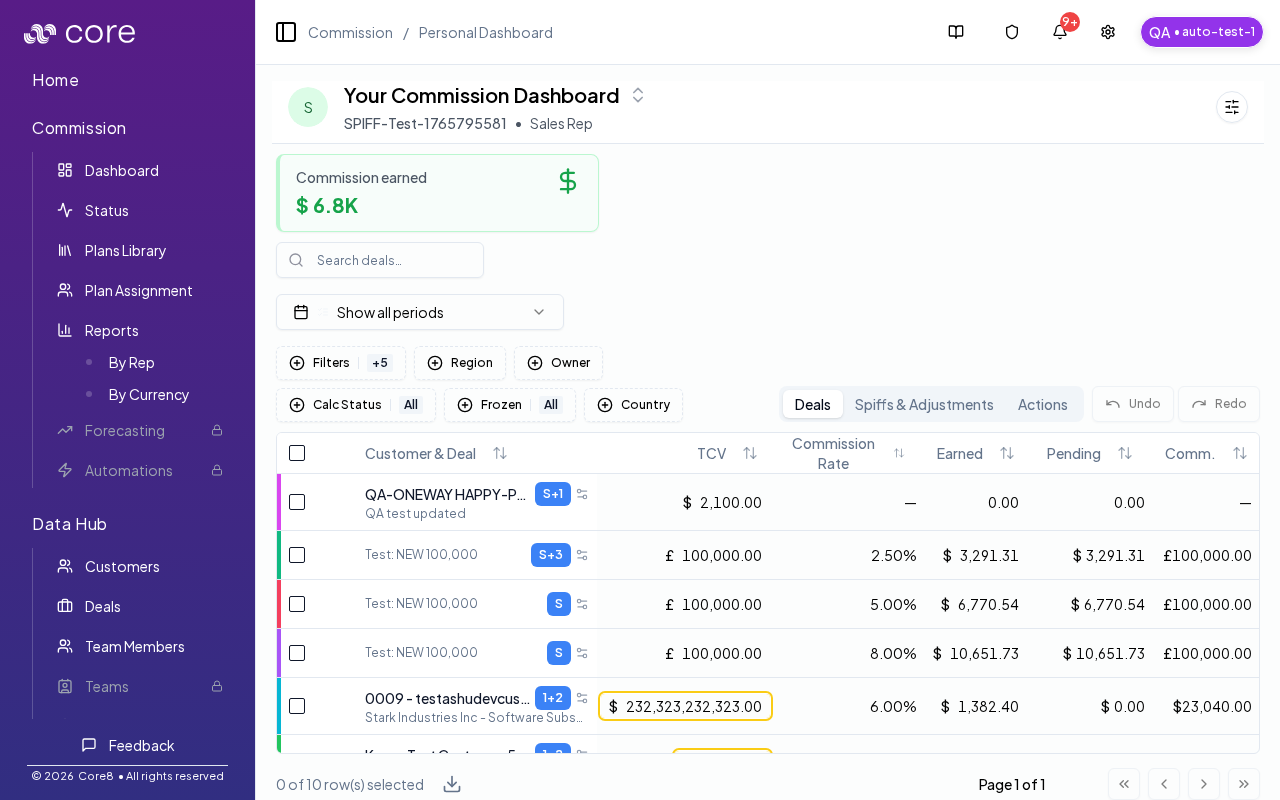
What you can do on this page
- Track your earned, pending, waiting, and paid totals for a period.
- Review your deals and the status badges that affect payout timing.
- Drill into a deal to review details, variables, and discussion context.
- Review spiffs and adjustments tied to your deals.
- See action items that need your attention (Actions tab).
Access
- Open Commission → Dashboard in the app.
- The dashboard opens to your personal view.
- If you see an access-required screen, ask an admin to link your personnel record.
What you will see
- Totals for earned, pending, waiting, and paid commissions.
- A Deals tab with your commission deals, status badges, and key dates.
- A Spiffs & Adjustments tab with your bonus and adjustment activity.
- An Actions tab with items that need your attention.
Deal insights
- Open the variables sidebar to review the fields used in your calculations.
- Open a deal details page to review the Deal Details tab and related context.
- Use the Deal Discussion on a deal to ask for updates or clarifications.
This is a view-only experience. If anything needs to be updated, use the deal Discussion to request changes.
How to verify your dashboard is set up correctly
- Confirm you can open Commission → Dashboard without an access-required screen.
- Change the period and confirm totals and the Deals list update to match the selected period.
- Open a deal and confirm the deal detail page loads and shows expected dates/amounts.
Common issues
- My totals do not match what I expected: confirm you are looking at the right period, then open a deal and use the Calculation view to see plan selection, gates, and effective values.
- A deal is not showing up: clear search/filters and confirm the deal is assigned to you (and in the selected period). Split/child deals may appear under a parent.
- Numbers changed since yesterday: overrides, plan changes, or a recalculation can move amounts; check the deal's audit/history and the calculation snapshot.