

What you can do on this page
- Understand which plan was selected and why (Plan Selection step).
- See which date anchored the deal to a period (Anchor Date step).
- Review the effective inputs used for calculation (Build Input step).
- See how the calculator executed and produced results (Execution step).
- Diagnose waiting status by checking eligibility gates (Gates step).
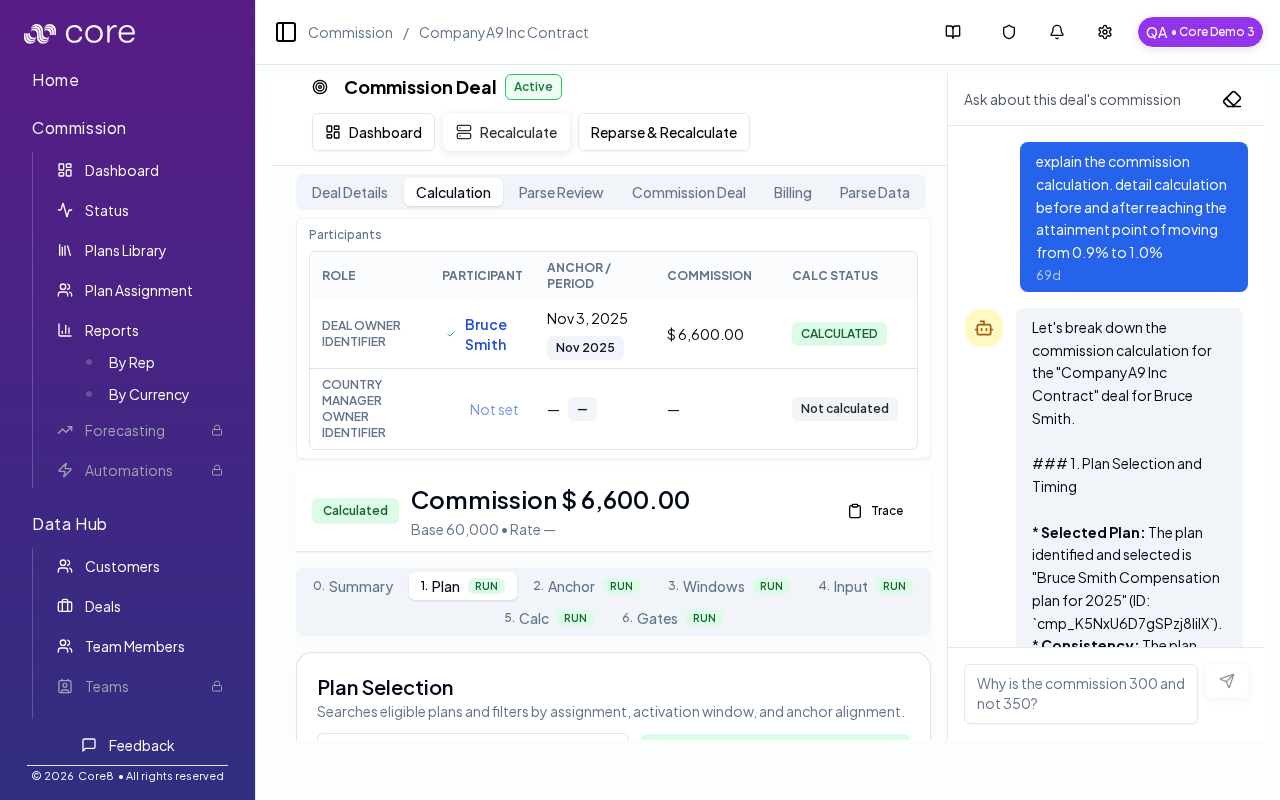
How to open the Calculation tab
- Open a deal detail page at
/{orgId}/commission/deal/{cmsnDealId}. - Select Calculation.
You can deep link to a specific step:
/{orgId}/commission/deal/{cmsnDealId}?tab=calculation&step=<n>
Steps (what they mean)
The calculation view is organized into steps:- 0 — Summary: overall result, status, and high-level context.
- 1 — Plan Selection: how Core8 chose the applicable plan for the deal/participant.
- 2 — Anchor Date: which date is used as the anchor and why.
- 3 — Windows & Pool: accrual/pool windows and deal ordering context.
- 4 — Build Input: the calculator variables and their effective values.
- 5 — Calculator Execution: the actual computation, base/rate, and derived commission.
- 6 — Gates: eligibility gates (invoice/payment/etc) that affect status and payout timing.
Effective vs source values
If a value was manually edited, the calculation view helps you distinguish:- Source values (original inputs)
- Effective values (after overrides)
Tips for investigations
- If a deal’s status is Waiting, check the Gates step to see what prerequisite is missing.
- If a plan looks unexpected, start with Plan Selection and Anchor Date.
- For multi-participant deals, use the participant selector to view each participant’s calculation.
When a rep says “this is wrong”
- Check Summary and Plan Selection to confirm the correct plan and participant.
- Verify the Anchor Date and period placement.
- Review Build Input for effective values and Gates for missing prerequisites.
Common issues
- I cannot find a rep or deal: check filters (team/member/status/period) and confirm the person has an active plan assignment for the time range.
- Overrides are disabled: the period or plan may be locked/frozen, or you may lack permission; confirm your role and period state.
- Totals do not reconcile: spot-check a single deal’s Calculation view, then confirm which plan version is approved and which effective values are used.