

What you can do on this page
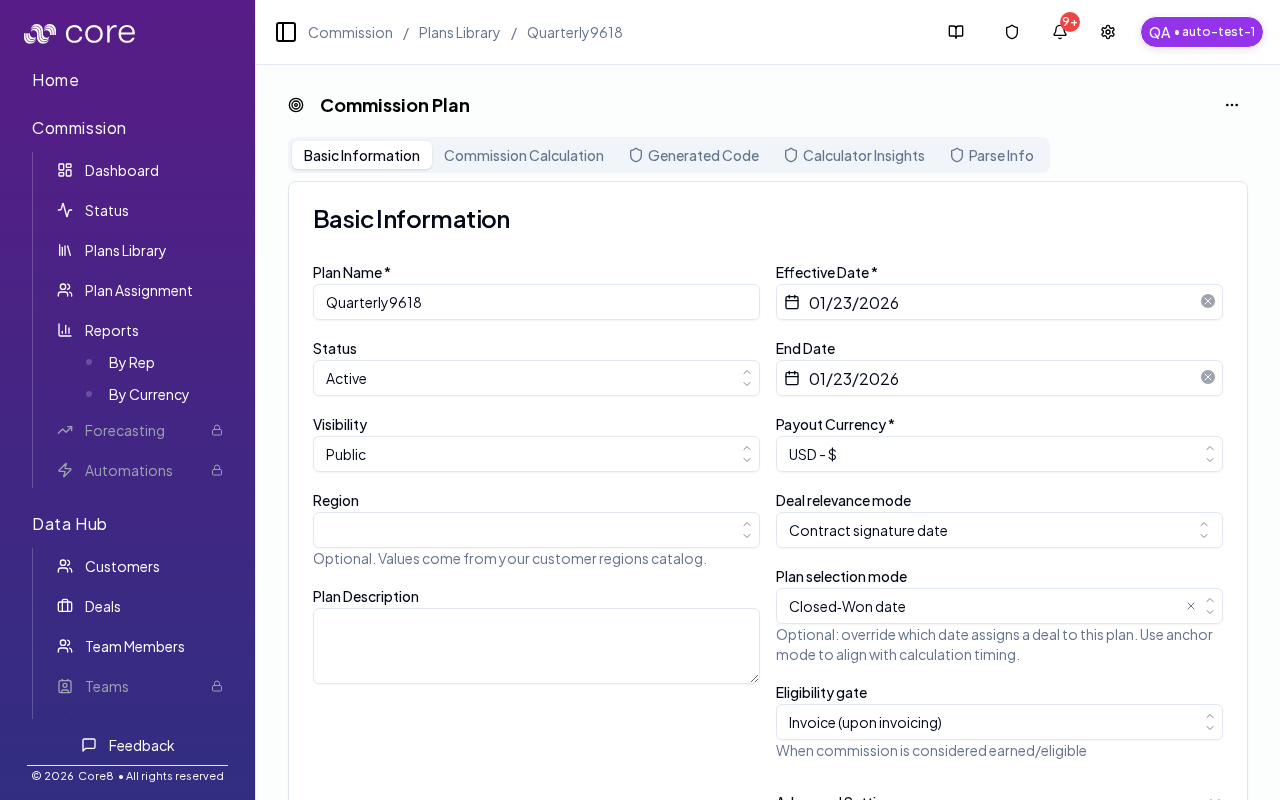
- Set plan metadata (name, dates, currency, visibility).
- Choose the deal anchor/timing behavior for period qualification.
- Configure plan selection behavior (when used).
- Configure eligibility gates that affect waiting/pending/paid status.
- Review advanced timing settings when your plan requires them.
Under the hood
Under the hood
- Scope of change: timing/selection/gates can move deals between periods, change the selected plan, and change deal status.
- Approval: calculations use the last approved plan version until changes are approved.
- How to verify: see How to verify plan configuration changes below.
- If it looks wrong: confirm changes are approved and the participant has an active assignment; then re-check the deal’s Plan Selection and Gates steps.
How to verify plan configuration changes
- After you edit timing/selection/gates, confirm the plan shows pending changes (then approve them when ready).
- Open one known deal and check Calculation:
- Plan Selection: confirm the expected plan is selected.
- Anchor Date / Gates: confirm the deal lands in the expected period and the gate behavior matches your intent.
- If you don’t see results change, confirm the participant has an active assignment for the plan and refresh after recalculation completes.
Basic information
Common fields include:- Plan name
- Status (draft/active/inactive/archived)
- Visibility (public/private)
- Region (optional, based on your customer region catalog)
- Effective date and end date
- Payout currency
Deal timing and selection
Plans define how deals qualify and how the plan is selected:- Deal relevance mode (anchor mode): which deal date qualifies deals for this plan.
- Plan selection mode (optional): overrides how deals are assigned to the plan (defaults to using anchor mode).
- Eligibility gate: when commission is considered earned/eligible (none/invoice/payment).
Advanced settings
Some timing defaults are inherited from org settings (for example accrual/payout cadence and fiscal year start). Plans can also include:- Attainment pooling window (optional)
- True-up cadence (optional)
Common issues
- Changing timing/selection did not move deals: confirm changes are approved and the participant has an active assignment; then spot-check a deal’s Plan Selection step.
- Deals moved to an unexpected period: review the anchor date choice (booking vs invoice vs payment) and any fiscal calendar settings.
- A deal became Waiting after adding a gate: ensure invoice/payment fields exist in Data Hub for the deal set (and that your integration supplies them).
- Plan editor:
/{orgId}/commission/plans-library/{planId} - Basic tab:
/{orgId}/commission/plans-library/{planId}?tab=basic