

What you can do on this page
- Review deal overview fields, hierarchy, documents, and variables summary.
- Explain outcomes step-by-step in the Calculation tab.
- Audit parsing evidence and artifacts in Parse Review / Parse Data.
- Run operational actions like recalculation and reparse when needed.
- Unfreeze or restore/delete deals when your workflow requires it.
Under the hood
Under the hood
- Recalculate: re-runs commission calculation using the current effective inputs and last approved plan version.
- Reparse: refreshes extracted/structured data, then impacts what inputs are available to calculation.
- Audit: parsing and calculation views provide an evidence trail for what was used and what changed.
- Common failure modes: missing inputs, eligibility gate evidence, frozen deals, and permission gating.
- How to verify: see How to verify an action took effect below.
- If it fails: review the error message; confirm the deal is not frozen and required gate data exists (see Calculation → Gates) before retrying.
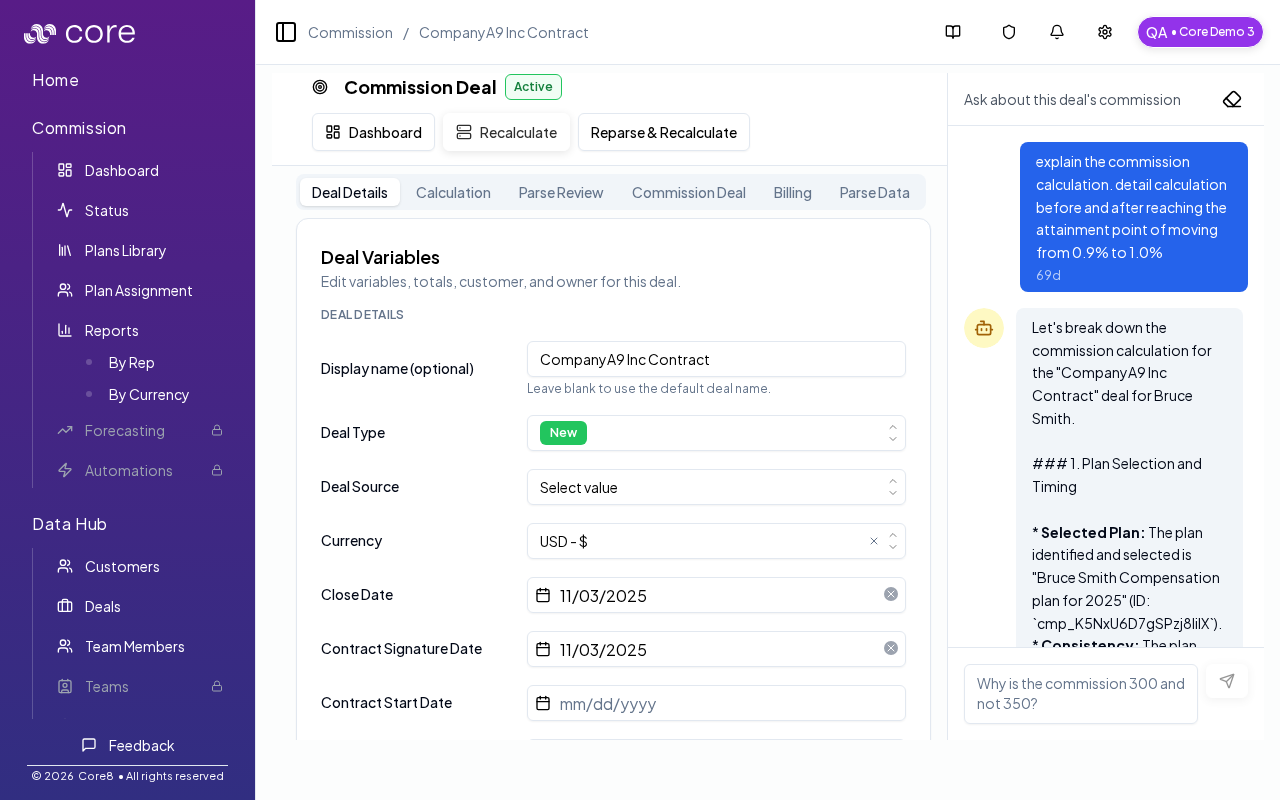
How to open a deal
- Open Commission → Dashboard (personal view or See All).
- Click the deal name in the table.
/{orgId}/commission/deal/{cmsnDealId}.
Tabs you may see
Managers typically have access to additional tabs beyond “Deal Details”:- Deal Details: overview fields, hierarchy links (parent/children), variables summary, and document access (when available).
- Calculation: step-by-step explanation of plan selection, dates/windows, inputs, and execution.
- Parse Review: audit-friendly review of parsing outputs and evidence.
- Commission Deal: raw commission deal JSON view for deep debugging.
- Billing (org-dependent): invoice detail and approval flows when billing parsing is enabled.
- Parse Data: structured parse artifacts used by the pipeline.
Manager actions
Depending on the deal and your permissions, you can:- Recalculate commissions for the deal.
- Reparse the deal (refresh extracted data).
- Restore / delete deals (for operational corrections).
- Unfreeze a deal to allow edits and recalculation.
How to verify an action took effect
- After you Recalculate or Reparse, refresh the deal page and confirm the status/totals reflect the updated inputs.
- Open Calculation and spot-check Plan Selection and Gates (these explain the most common “why didn’t it move?” cases).
- If you ran Reparse, confirm the structured fields you expect exist in Deal Details / Variables (or Parse Review, if you use it for evidence).
- If nothing changes, check Notifications (and Settings → Integrations → Logs if the action depends on upstream data) for errors, then retry once the blocker is resolved.
Notes on split deals
Some deals are part of a split “family”. The dashboard may show a parent deal row for grouping, but it hides “View deal details” for parent rows. Open one of the child split deals for detailed review and calculations.Common issues
- I cannot find a rep or deal: check filters (team/member/status/period) and confirm the person has an active plan assignment for the time range.
- Overrides are disabled: the period or plan may be locked/frozen, or you may lack permission; confirm your role and period state.
- Totals do not reconcile: spot-check a single deal’s Calculation view, then confirm which plan version is approved and which effective values are used.