

What you can do on this page
- Invite users to your organization (individual or bulk).
- Grant or revoke roles that control access across the app.
- Bulk update roles across many users.
- Prevent lockouts by confirming risky self-role changes.
- Troubleshoot missing access by verifying a user’s assigned roles.
Under the hood
Under the hood
- Writes: role updates change org-level access immediately after the update completes.
- Safety checks: Core8 blocks removing a user’s last remaining role and prompts for self-demotion confirmation.
- Downstream impact: role changes gate visibility of Commission, Data Hub, and Settings pages.
- How to verify: see How to verify a role change took effect below.
- If it fails: review the error message for safety/permission blocks and confirm you still have manager access.
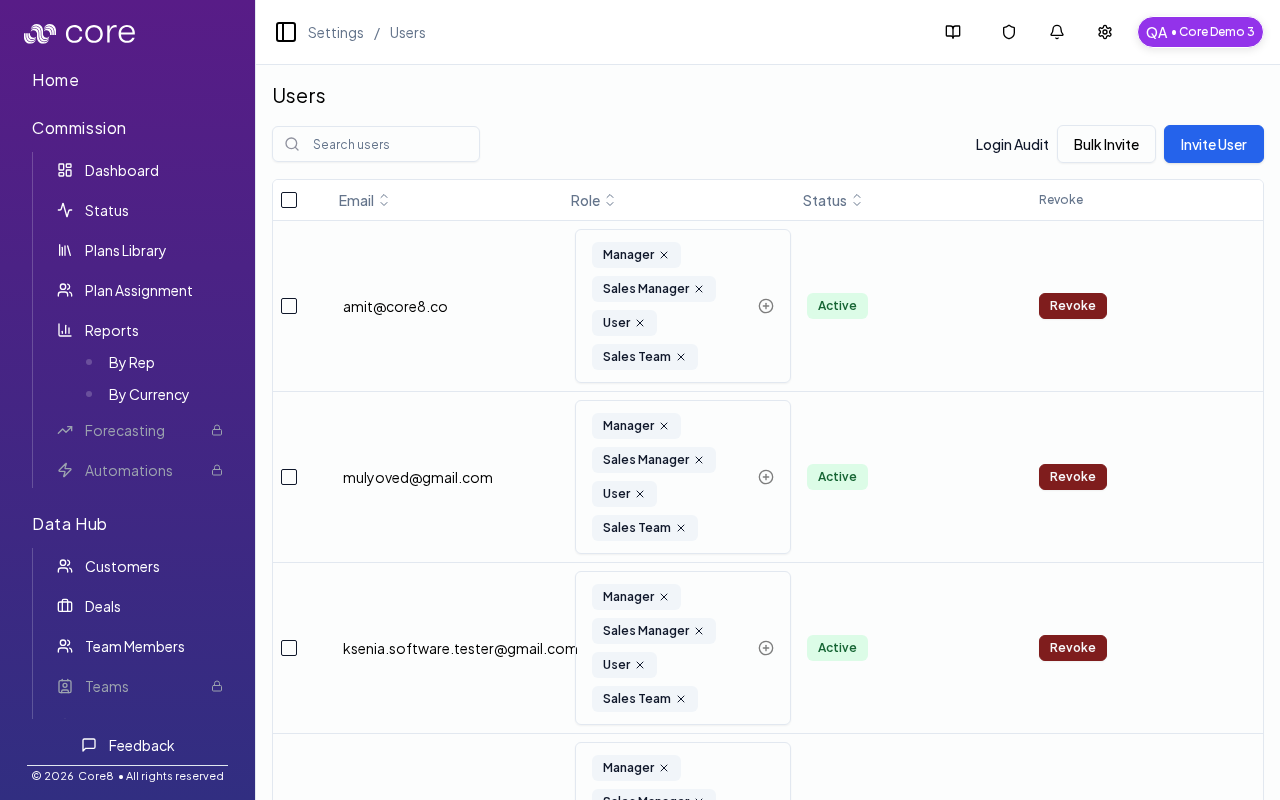
Access
- Open Settings → Users (in the header dropdown).
- URL:
/{orgId}/users
Invite users
You can invite users individually or via bulk invite. After invite, users appear in the list with their roles.Manage roles
Core8 uses organization roles (for example, manager and sales roles) to gate access across:- Commission pages (dashboard, status, plans, assignment, reports)
- Data Hub pages
- Settings pages
How to verify a role change took effect
- Refresh the page and confirm the user’s role(s) reflect the change.
- Have the user reload the app and confirm they can (or can’t) access the gated area (Commission / Data Hub / Settings).
- If the change was meant to unblock an action, retry the action after refresh (for example: exporting reports, approving a plan, editing overrides).
Safety: self-demotion
If you remove your own manager role, Core8 prompts for confirmation to prevent accidental lockout.Bulk actions
Use selection + bulk actions to:- add/remove a role across multiple users
- revoke access for multiple users (where permitted)
Common issues
- I do not see Settings / Users & Permissions: you likely do not have the Manager role (ask a manager to grant access).
- I cannot remove a role: Core8 prevents leaving a user with zero roles. Assign at least one role before removing another.
- I removed my own manager access: another manager must re-grant it (or contact support if you are locked out).